
CrosswalkEnv API
CrosswalkEnv provides configuration task parameters for running Crosswalk Task sessions.
Python Parameter |
CLI Argument |
Type |
Default |
Description |
|---|---|---|---|---|
|
|
|
|
Identifier of the participant associated with the collected data. |
|
|
|
|
Identifier of the experiment session. |
|
|
|
|
Maximum number of episodes allowed in a session. |
|
|
|
|
Maximum session duration in seconds (default: 20 minutes). |
|
|
|
|
Maximum duration of each episode in seconds. |
|
|
|
|
Remaining-time threshold, in seconds, at which the timer is highlighted in red. Set to |
|
|
|
|
Base score awarded per unit of upward movement for each crossed road. |
|
|
|
|
Bonus score awarded per second remaining. |
|
|
|
|
Collision penalty for red vehicles. Set to |
|
|
|
|
Collision penalty for yellow vehicles. Set to |
|
|
|
|
Collision penalty for green vehicles. Set to |
|
|
|
|
Base random seed used to configure the initial episode of the session. |
|
|
|
|
Whether to save the collected data. Specifying |
|
|
|
|
Base directory where collected data are saved. |
Session identification
Subject ID
Python parameter: subj_id
CLI argument: --subj-id
Type: int
Default: 1
subj_id (or --subj-id in the CLI) identifies the participant
associated with a Crosswalk Task session.
For an actual data-collection experiment, assigning a unique participant identifier is recommended to distinguish the behavioral data collected from different participants.
For example, the following command assigns participant ID 1000:
task.run_session(subj_id=1000)
Session ID
Python parameter: session_id
CLI argument: --session-id
Type: int
Default: 0
session_id (or --session-id in the CLI) identifies a particular experiment session. It can be used to distinguish multiple sessions performed by the same participant, such as practice sessions and main experimental sessions.
For example, the following configuration assigns session ID 1:
task.run_session(session_id=1)
Session termination
Maximum Episodes
Python parameter: max_episodes
CLI argument: --max-episodes
Type: int
Default: -1
max_episodes (or --max-episodes in the CLI) specifies the maximum number of episodes allowed in an experiment session.
When the experimental protocol requires participants to complete a predetermined number of episodes, set max_episodes to the desired number.
For example, the following configuration sets the maximum number of episodes to 10:
task.run_session(max_episodes=10)
The default value is -1, indicating that no explicit episode-count limit is specified.
Maximum Session Duration
Python parameter: max_seconds
CLI argument: --max-seconds
Type: int
Default: 1200
max_seconds (or --max-seconds in the CLI) specifies the maximum duration of an experiment session in seconds.
When the experimental protocol requires participants to interact with the Crosswalk Task for a fixed amount of time, set max_seconds to the desired duration.
For example, the following configuration sets the session time limit to 20 minutes:
task.run_session(max_seconds=1200)
If max_seconds is omitted, the default session duration is 1200 seconds (20 minutes).
Common session durations include:
Duration |
|
|---|---|
5 minutes |
|
10 minutes |
|
20 minutes |
|
Episode configuration
Episode Duration
Python parameter: episode_duration_sec
CLI argument: --episode-duration-sec
Type: int
Default: 30
episode_duration_sec (or --episode-duration-sec in the CLI) specifies the maximum time allowed for each individual episode, in seconds.
Unlike max_seconds, which controls the duration of the entire session, episode_duration_sec controls the time available within each episode.
For example, the following configuration sets the episode time limit to 60 seconds:
task.run_session(episode_duration_sec=60)
If episode_duration_sec is omitted, the default episode duration is 30 seconds.
Time Warning Threshold
Python parameter: time_left_warning_threshold_sec
CLI argument: --time-left-warning-threshold-sec
Type: int
Default: 10
time_left_warning_threshold_sec (or --time-left-warning-threshold-sec in the CLI) specifies the remaining-time threshold at which the episode timer is highlighted in red.
When the remaining time reaches the specified threshold, the timer is highlighted to warn the participant that the episode is approaching its time limit. The default value is 10 seconds.
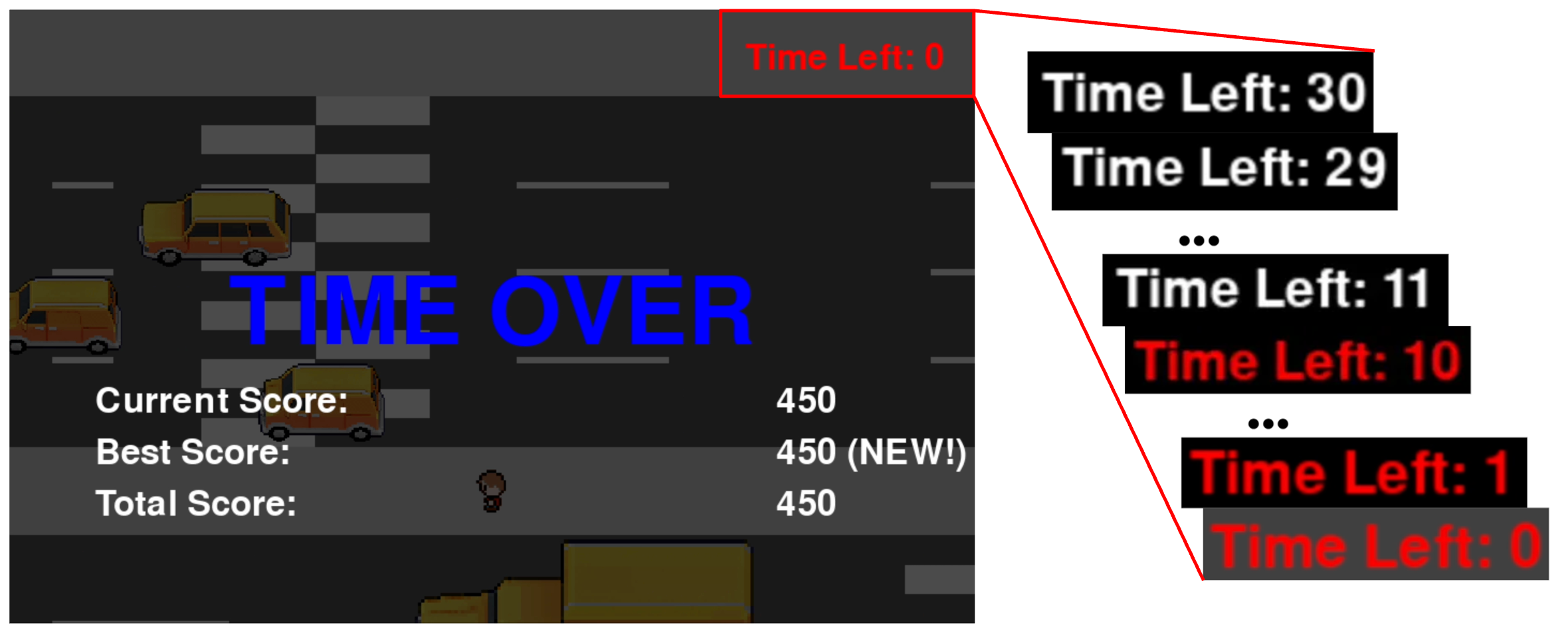
For example, the following configuration highlights the timer when 5 seconds remain:
task.run_session(time_left_warning_threshold_sec=5)
Setting the value to 0 can disable the warning:
task.run_session(time_left_warning_threshold_sec=0)
Scoring parameters
Basic Score per Grid
Python parameter: basic_score_per_grid
CLI argument: --basic-score-per-grid
Type: int
Default: 50
basic_score_per_grid (or --basic-score-per-grid in the CLI) determines the basic score awarded each time the player successfully crosses a road. The amount is calculated by multiplying the number of grid units moved upward up to that point by basic_score_per_grid.
Basic Score = Number of Grid Units Moved Upward × basic_score_per_grid
For example, if the player has moved upward by 5 grid units when successfully crossing a road, and basic_score_per_grid is set to 100, the player receives 500 points.
task.run_session(basic_score_per_grid=100)
Bonus Score per Second
Python parameter: bonus_score_per_sec
CLI argument: --bonus-score-per-sec
Type: int
Default: 50
bonus_score_per_sec (or --bonus-score-per-sec in the CLI) determines the bonus score awarded for each second remaining when an episode is completed.
For example, with bonus_score_per_sec=100, completing an episode with 8 seconds remaining awards an additional 800 points (100 × 8).
task.run_session(bonus_score_per_sec=100)
Vehicle collision penalties
CrosswalkEnv provides separate collision penalty parameters for red, yellow, and green vehicles. These parameters allow the consequences of collisions with different vehicle types to be configured independently.
Red Vehicle Penalty
Python parameter: red_car_penalty
CLI argument: --red-car-penalty
Type: int
Default: 1000
red_car_penalty (or --red-car-penalty in the CLI) specifies the score penalty associated with a collision involving a red vehicle.
The default penalty is 1000 points, making red vehicles the most heavily penalized vehicle type under the default configuration.
For example, the following configuration sets the red vehicle collision penalty to 1500 points:
task.run_session(red_car_penalty=1500)
Setting the value to 0 disables red vehicle appearance.
Yellow Vehicle Penalty
Python parameter: yellow_car_penalty
CLI argument: --yellow-car-penalty
Type: int
Default: 500
yellow_car_penalty (or --yellow-car-penalty in the CLI) specifies the score penalty associated with a collision involving a yellow vehicle.
The default penalty is 500 points, which is lower than the red vehicle penalty but higher than the green vehicle penalty.
For example, the following configuration sets the yellow vehicle collision penalty to 750 points:
task.run_session(yellow_car_penalty=750)
Setting the value to 0 disables yellow vehicle appearance.
Green Vehicle Penalty
Python parameter: green_car_penalty
CLI argument: --green-car-penalty
Type: int
Default: 100
green_car_penalty (or --green-car-penalty in the CLI) specifies the score penalty associated with a collision involving a green vehicle.
The default penalty is 100 points, making green vehicles the least heavily penalized vehicle type under the default configuration.
For example, the following configuration sets the green vehicle collision penalty to 200 points:
task.run_session(green_car_penalty=200)
Setting the value to 0 disables green vehicle appearance.
Summary
The default collision penalties for each vehicle type are summarized below:
Vehicle type |
Default penalty |
|---|---|
Red |
|
Yellow |
|
Green |
|
Note
Setting the collision penalty to 0 disables the appearance of the corresponding vehicle type, rather than simply removing its collision penalty.
For example, the following configuration can be used to only enable green vehicles.
task.run_session(
    red_car_penalty=0,
    yellow_car_penalty=0,
    green_car_penalty=100,
)
Random seed
Python parameter: seed
CLI argument: --seed
Type: int
Default: 0
seed (or --seed in the CLI) specifies the base random seed used to determine the environment seed for each episode.
The episode seed is calculated from the base seed, session ID, and episode number as follows:
episode_seed = seed + session_id * 1000 + episode_count
Here, episode_count is the episode number within the session, starting from 1.
For example, the following configuration sets the base seed to 42 and the session ID to 1:
task.run_session(session_id=1, seed=42)
The resulting episode seeds are:
Episode 1 →
1043Episode 2 →
1044Episode 3 →
1045…
If seed is omitted, the default base seed is 0.
Note
Seed ranges are separated into blocks of 1000 based on session_id and may overlap if a session exceeds 1000 episodes. This design assumes that participants are unlikely to complete more than 1000 episodes within a single session.
Data Saving
Enable Data Saving
Python parameter: save
CLI argument: --no-save
Type: bool (Python) / flag (CLI)
Default: True
save (or --no-save in the CLI) controls whether the behavioral data collected during an experiment session are saved.
By default, data saving is enabled.
To disable data saving through the Python API, set save=False:
task.run_session(save=False)
In the CLI, the equivalent behavior is achieved by specifying the --no-save flag:
python -m crosswalk_env.task --no-save
Disabling data saving can be useful for practice sessions or software testing where the collected behavioral data do not need to be retained.
Save Directory
Python parameter: base_save_dir
CLI argument: --save-dir
Type: str
Default: "data"
base_save_dir (or --save-dir in the CLI) specifies the base directory where collected behavioral data are saved.
For example, the following configuration sets the base saving directory to "experiment_data":
task.run_session(base_save_dir="experiment_data")
If omitted, the default directory is "data".